Site management software, built around your company
Defects end up pinned on the apartment plan. Work stages close with photo proof. The technical book builds itself as the work happens - not the night before the inspection.
Running on a 782-apartment site · since June 2026Figures from a single site · production, July 2026
Does something always slip through on your site too?
This is not a rhetorical question. Every line below is an ordinary day on a construction site - possibly yours. If you recognise at least three, the rest of this page was written for you.
You find out about a defect at handover, when the client points at it - and it is already under the finish.
To find out what happened on block B today, you make three phone calls and still are not sure.
You keep records in a spreadsheet that three people fill in three different ways.
A subcontractor says they are done, but you cannot take their word for it without driving over.
You assemble the technical book in the last week, from memory and from binders.
The information exists on site. It is just scattered.
The photo is on the site manager's phone. The context, in a WhatsApp thread from three weeks ago. What was checked, in someone's head. The report, in a folder. The plan, in an email. Nothing is missing. It is just that nothing is in one place - and when the inspection or the handover comes, that costs you.
- Defects get lost in conversations
- You do not know what was checked until you ask
- The technical book is written before the inspection, from memory
- Plans sit in folders or in emails
- At handover you cannot prove what you fixed
- To know what is happening, you drive there
- Every defect has a photo, a spot on the plan, an owner and a deadline
- Every check has a photo, a person and a timestamp
- It builds itself as the work happens
- The plan is on the phone, with the defects on it
- Full history, exportable
- You see it from the office, in real time
Three steps. The rest happens on its own.
Upload the plan
exactly as you have it
DWG, DXF or PDF - the file exactly as the designer sent it. You ask nobody to export anything, you do not open AutoCAD. We detect the rooms and group them into apartments.
Whatever detection gets wrong, you fix from the editor in two minutes.
One photo
and one sentence
"water leak bathroom ceiling 3A B2" That is all. No form, no menus. Works with gloves on, in direct sun. With no signal, the photo uploads itself once coverage is back.
The defect lands
on the right plan
Automatic identification (AI) reads the sentence, recognises the block, the floor, the apartment and the room, and drops a pin coloured by severity.
When it is not sure, it does not guess - it asks you to confirm.
Walk through the platform, not through screenshots
An interactive demo, with fictional data. Filter, click a defect, see what the platform looks like from the inside - no account, and nothing you can break.
You do not search through reports. You ask.
You ask in plain language about the state of the works and your schedule, and the platform answers on the real data of your site.
Report from the field in under a minute
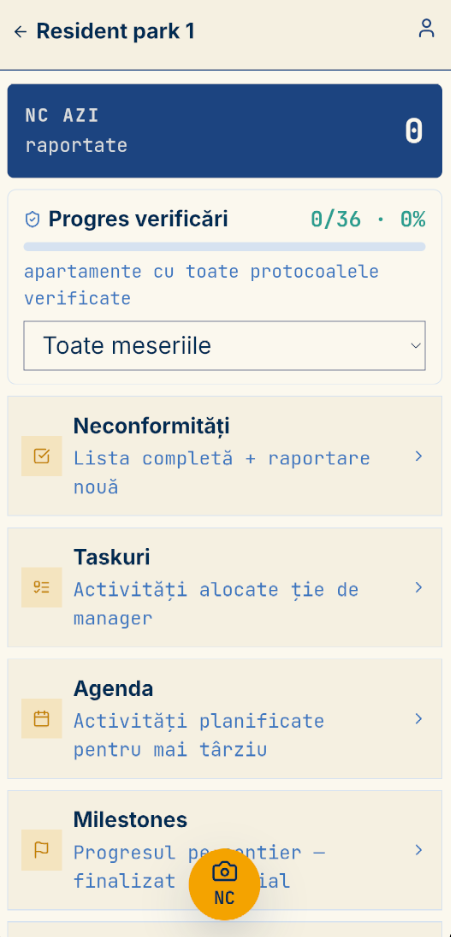
One photo and one sentence - that is it. An Android app, designed for gloves, sun and weak signal. With no coverage, photos upload themselves once you are back in range.
Everything that keeps execution under control, in one place
Defects
From the photo on site to the approved fix. Assignment, deadline, motivated rejection, photo on repair, full history.
Plans
DWG, DXF or PDF, just as the designer handed them over. Rooms and apartments detected automatically. Versions and comparison between them.
Work stages
A catalogue per project type. Determinant phases cannot close without approval. Photo proof at every stage.
Protocols
You tick what you checked, with a photo. If something is wrong, you raise the defect straight from there - the location carries over by itself.
Technical book
Reports compliant with HG 273/1994. Signing, PDF export, complete archive folder.
Reports
Import of the execution schedule (MS Project), with versions and comparison - see what slipped. Reports by person, by area, by progress, with saved filters.
Roles and access
Five roles, with rights per person. A subcontractor sees only what you assigned them, not the whole site.
Tasks and agenda
Tasks with approval, milestones with a gallery you share through a link - without handing out accounts to everyone you want to show progress to. Agenda with overdue items flagged.
MEP tracked on the plan - element by element
This is the part international products do not reach. We do not just detect rooms - we track every circuit as a separate element on the plan: valves, manifolds, drainage stacks, sockets, switches.
A pipe gets buried under the screed. After that you cannot check it - you can only break it open. That is why every element has a status that moves forward, with photo proof at each step.
Recognised automatically on the plan:
This part did not come out of a product plan, but out of a real need of the first company we work with. That is how everything we build comes about.
Of the 64 plans processed on that site: 22 electrical, 14 heating, 14 plumbing, the rest architectural.
A real site, since June
The MEP contractor above is not hypothetical. They use the platform on a real residential development - that is where the figures at the top of this page and the depth on MEP come from.
The part that matters: in the first two weeks, three requests from them were shipped the same day we received them. That is the difference between a subscription and someone shaping the process around you.
Talk about your project →Built on the law you are inspected against
Determinant phases. Hidden-works reports. The technical book of the construction. Three things a Romanian inspection asks you for and international products do not have - because they are written into Romanian law, and this market is too small for them.
For us it is the only market.
Determinant phases
You mark the critical stages. They cannot close without approval - exactly as the procedure requires.
Reports under HG 273/1994
Hidden works, qualitative acceptance by phase, handover of the work front. Generated from what is already in the platform.
Technical book
It builds itself as the work happens. You export it as a complete folder whenever you need it.
History that cannot be rewritten
Every action recorded, with author and time. Nothing can be deleted from the app - not even from administration.
Two people, two different needs
For you, as technical director
- You see what is happening on every site without driving there
- You have proof of what was checked, when and by whom
- The paperwork is ready before the inspector calls
- You hand over with a full history, not with explanations
- Reports by person, by area, by stage
For the person in the field
- One photo and one sentence. Under a minute.
- Works with gloves, in the sun, on any Android phone
- No signal? Photos upload themselves once you are back in coverage
- Nothing to configure - you open it and report
- You see what you reported and what got fixed
We do not sell you a subscription. We build your process.
The platform exists and it runs. But no two sites are alike. We start from what we have, look at how you actually work, and shape it around you. Whatever is missing, we build.
Conversation
30 minutes. You tell us how you work, we show you the platform on real data, and we tell you honestly whether we can help.
Process review
We look at your flow: who reports, who approves, which documents you need at an inspection.
Implementation
We configure the platform around your process. We upload your plans and apartments. Whatever is missing, we build.
Go live
We train the team and stay close. Requests that come up get handled quickly - usually very quickly.
Frequently asked questions
What does it cost?+
It depends on the project - how many sites you run, how many people, and what needs adapting. We do not sell a standard subscription, so a price on a page would be meaningless. The first conversation is free and we give you an order of magnitude in it.
What if I need something the platform does not do?+
Then we build it. We do not sell a closed product - let us talk about what you are missing.
How long until we can use it on site?+
Within 48 hours. The platform already runs, so we are not starting from zero.
My field crew are not good with apps. Will this work?+
The field app asks for exactly one thing: a photo and a sentence. No form, no menus, nothing to configure - we set the accounts up, the person just opens it and reports. It is designed for gloves, sun and weak signal, and we train the team on site at go-live. Anyone who can send a photo on WhatsApp can handle this.
Does it work without signal on site?+
Partly - and it matters to be precise. You take the photos and file defects with no signal: they are saved on the phone and upload themselves once you are back in coverage. But the app needs internet to start.
What do I take with me if we stop working together?+
The data stays yours. You export the technical book as a complete archive folder, the reports as PDFs, and the action history. We hold nothing hostage, and if you need an export format we do not have yet, we build it.
Where is the data stored?+
On servers in the European Union, on our own infrastructure. Plan conversion happens in-house, with open-source tools - it does not go through CloudConvert or Autodesk. Defect photos are never sent outside. What passes through our suppliers, and who they are, is written in the app's policy - we put it on the table before the contract, not after.
What happens to the photos from site?+
They are compressed on the phone before they leave - by roughly a factor of ten, so they go through on weak signal. And their EXIF data is stripped automatically, GPS coordinates included: we do not store where the person physically stood. Defect photos are not sent to any third party.
What do subcontractors see of my data?+
Only what you assign them. A subcontractor does not see the whole site, only their own works and areas. Permissions are checked on the server, on every request - it is not just hidden in the interface.
Work out how much time you save
We are not promising you a percentage. Put in your own numbers, see the assumption, adjust it. What comes out is an estimate on your data - not a figure we are selling you.
The minutes assumption is a starting point, not a promise - change it to whatever you believe. The maths is simple: people × reports per day × minutes × 21 working days. Nothing leaves your browser; it is all computed locally.
Let us see whether it fits your site
30 minutes, no sales pitch. We show you the platform on real data and tell you honestly whether we can help or not. We reply within 24 working hours.
or write to us directly: contact@fastcodingagency.com